Home and bookings
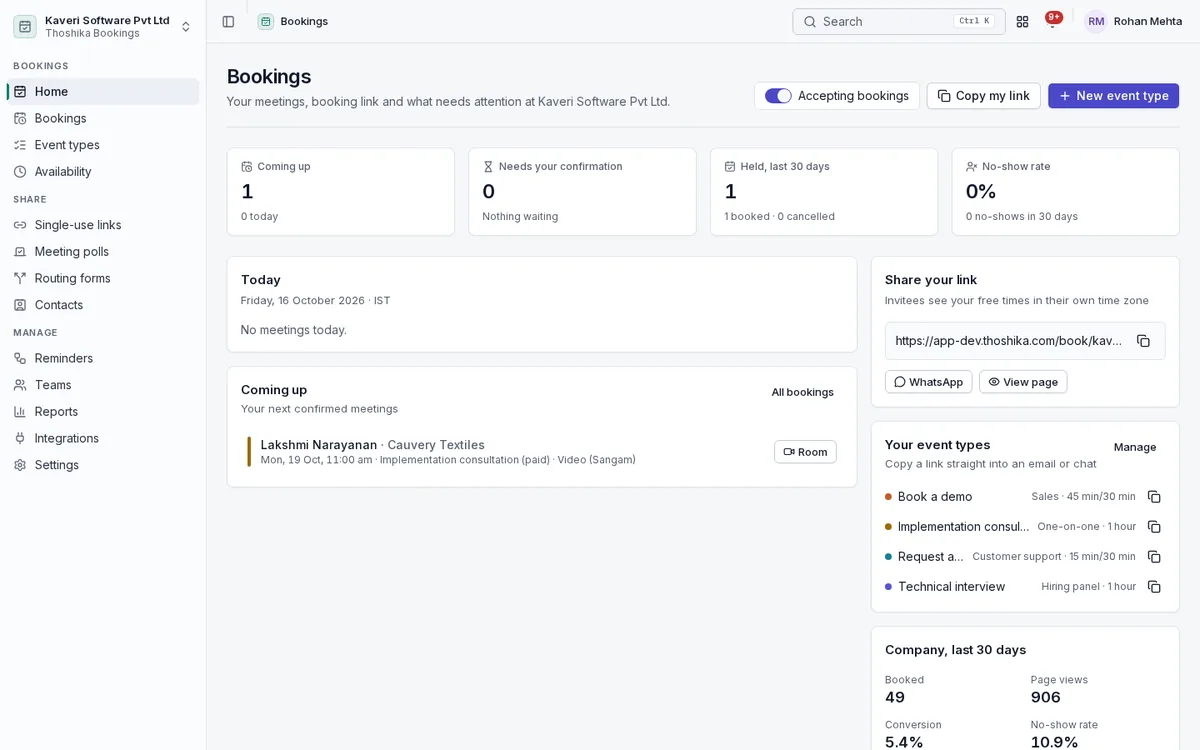
Each host starts from today’s meetings, what needs confirming and their own booking link, and manages every booking from one list.
- Coming up, needs your confirmation, held in the last 30 days and no-show rate
- Accepting-bookings switch and copy or WhatsApp share of your link
- Booking list with filters and a calendar week view
- Confirm, decline, reschedule, cancel or mark a no-show from the booking sheet
- Company figures for bookings, page views, conversion and no-shows
Event types
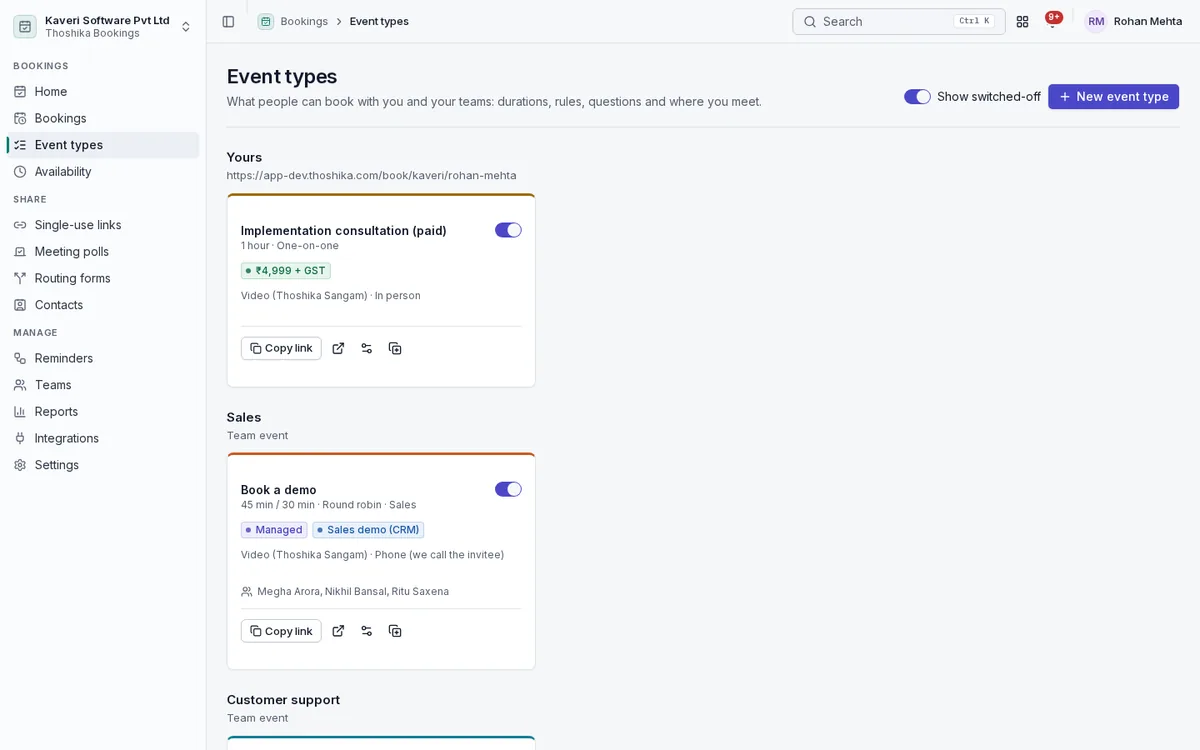
Describe what invitees can book, who hosts it and the rules that apply.
- One-on-one, round robin (by availability or equal distribution), collective and group events with seats
- Several duration options, buffers, minimum notice, slot increments and daily or weekly limits
- Rolling, working-day or fixed booking windows, and cancellation cut-offs
- Custom questions, up to ten guests, and optional host confirmation
- Recurring bookings for a series of meetings
- Secret events and admin-managed team events
Availability that reflects real work
Slots are worked out from each host’s schedules and everything else that keeps them busy.
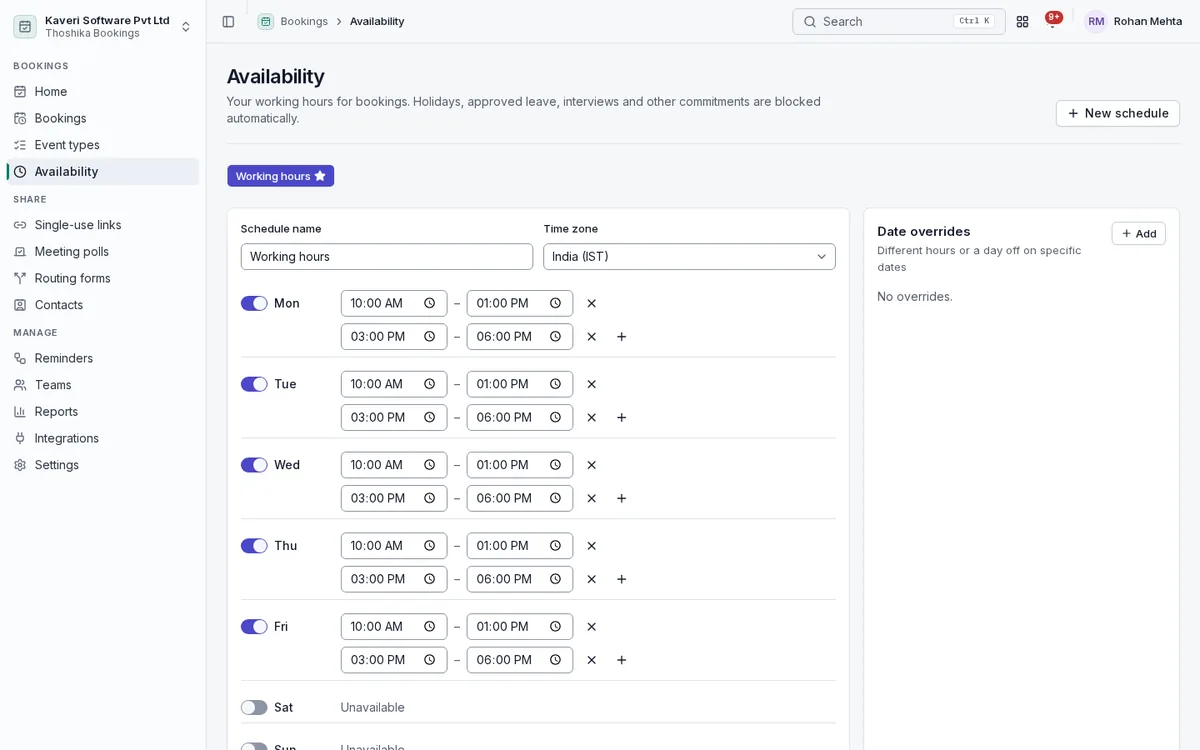
- Named weekly schedules with date overrides and time zones
- People holidays for the host’s state and approved leave, including half days
- Recruiting interview panels, board meetings and live Sangam calls
- Busy times from Google Calendar, Microsoft 365 or any secret ICS address
- A week preview showing exactly what invitees will see
- Each slot is re-checked at booking time so two people cannot take the same one
Locations, video and resources
Let invitees choose how to meet, and create the meeting room automatically.
- Sangam video room created on confirmation, with a guest link that needs no login
- Invitee phone, host phone or an in-person address with a map link
- Pasted Google Meet, Microsoft Teams or Zoom links
- Field visits at the customer’s address when Field Service is on
- Meeting rooms and equipment reserved with Workplace
Sharing: links, polls and routing forms
Share a company, team or personal page, embed it on your site, or route visitors to the right event.
- Company, team and host pages with your logo, colour and welcome text
- Booking pages on your own custom domain and in Indian languages
- Inline, pop-up or floating-badge embed from one script
- Routing forms that send visitors to an event, a URL or a message, and create a CRM lead on submit
- Meeting polls to agree a time with a group
- Single-use links with prefilled invitee details
- Invitee manage page to reschedule, cancel, add to a calendar or join
Contacts and teams
Keep a record of everyone who books, and organise hosts into teams with their own pages.
- Invitee contacts with booking history and CSV export
- Teams with members and a public team page
- Round-robin pools with priorities and weights
- Blocklist for unwanted invitees
Reminders and workflows
Send reminders and follow-ups automatically, before and after each meeting.
- Reminders before the start and follow-ups after, to invitees and hosts
- Triggers on booking, cancellation and no-show, with merge-field templates
- No-show marking with a rebook email
- WhatsApp click-to-chat reminders for hosts
- .ics invitations on every confirmation, reschedule and cancellation
Integrations and reports
Connect calendars and other Thoshika apps, and see how your booking pages perform.
- Google and Microsoft 365 calendar connections, plus a private ICS feed of your bookings
- Interview links for Recruiting, callback links for Support tickets and a board-meeting helper for Compliance
- Outgoing webhooks for booking events
- Reports by event, host, team and status, conversion, cancellations with reasons, popular days and times, lead time and source
- CSV export of bookings
Settings
Bookings admins set company branding and defaults once for every host.
- Branding, booking page text and embed code
- Calendar connection settings and blocklist
- Bookings admin role for teams, managed events, routing forms, workflows and company reports
- Privacy notice on booking pages and invitee erasure by admins