Home and my time
Employees see their own day; managers and admins see a team summary.
- Timer on the desktop agent, the web and the mobile app
- Projects and tasks from Projects, or People time codes
- Day view of activity, entries, screenshots, idle time and apps and sites
- Idle detection with a keep, remove, meeting or break choice
- Manual time requests approved by the manager
- Sangam and Bookings meetings turned into time entries
Desktop agent
A visible tray app for Windows, macOS and Linux that the employee can always see and stop.
- Sign-in by device code approved in the browser
- Tray icon with the running timer, task picker, today’s total, pause and delete last screenshot
- Shift-aware start and stop inside working hours only
- Offline queue that syncs safely when the connection returns
- Signed installers with automatic updates
- Browser extension timers and a global start-stop shortcut
Timesheets, attendance and WFH
Remote feeds the records you already use rather than creating new ones.
- Net tracked hours written into the People weekly timesheet, never overwriting the employee’s own edits
- Employee reviews and submits; the manager approves in People
- Approved billable hours reach Projects billing and Books invoices
- Hourly and contract pay rates flow into People payroll
- First and last activity become attendance on remote and WFH days, with WFH requests
- Under-target reminders when tracked hours fall short
Stand-ups and check-ins
Keep a distributed team in step without another meeting.
- Async daily stand-ups with your own questions and schedule
- Weekly check-ins with a mood score
- Answers posted as a digest to the team’s Sangam channel
- Automatic work status in Sangam showing what someone is working on
Live team, activity and apps
See how time is spent at team level, from counts and categories rather than content.
- Live team status with working, idle, break and offline, alongside Sangam presence
- Timeline per person and timesheet review with activity
- Activity measured as keyboard and mouse counts per 10-minute slot, never which keys
- Application and website domain usage, with window titles only when the employee opts in
- Productive, neutral and unproductive categories per company and team
Screenshots and screen views, under policy
Where a company chooses to use them, captures follow one policy, one retention clock and one audit trail.
- Screenshots off, blurred on the device (default) or full, at random times in each interval
- Employees can delete a screenshot within a grace window, which removes that time
- Short screen clips and live screen view, both off by default, with a visible banner and a required reason
- Microphone clips off everywhere by default; only a tenant admin can enable them, and only with each employee’s signed consent
- Media encrypted per company before storage
- Every view and playback audited and shown to the employee
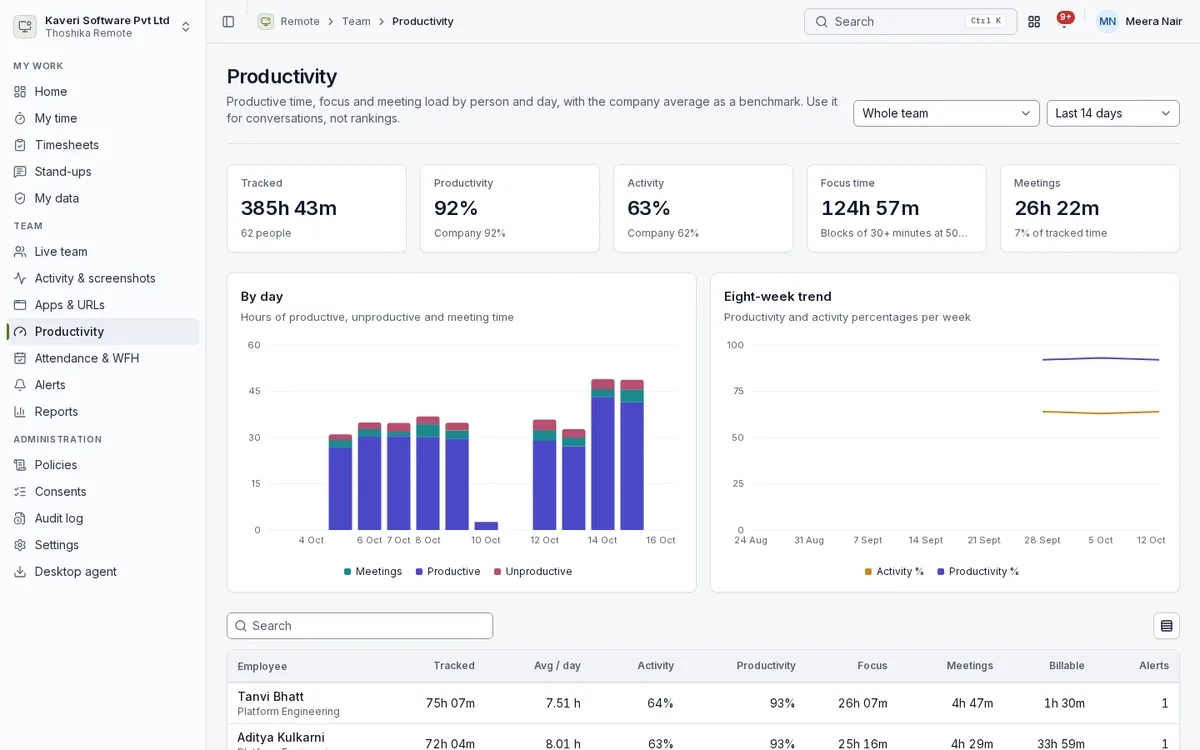
Productivity, alerts and reports
Use the numbers for conversations, with the company average as a benchmark.
- Tracked, productive, focus and meeting time by person and day, with an eight-week trend
- Overtime, burnout, low activity, late start, off-day work and unusual-input alerts
- Project time with billable split, payroll hours, manual edits and idle reports
- Connectivity report for agents that stopped calling in
- CSV export, a weekly PDF and figures for Analytics
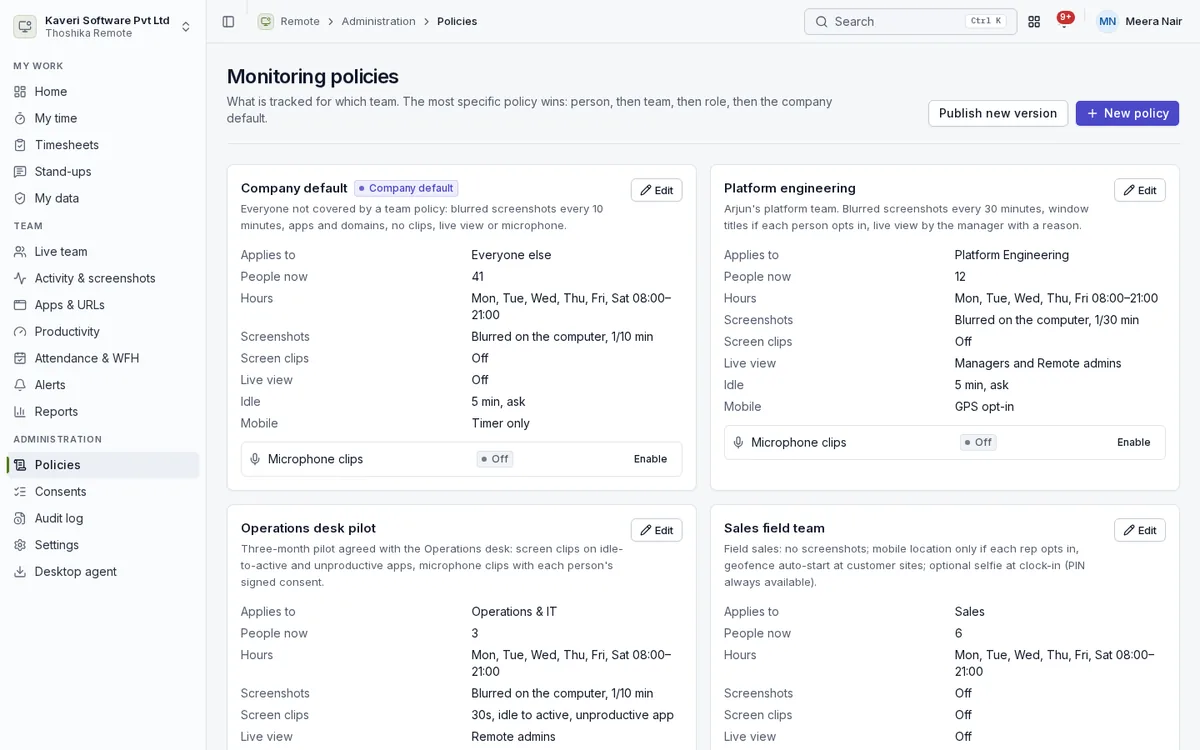
Policies, consents and the audit log
Admins decide what is tracked for whom, and every decision is recorded.
- Policies assigned to a person, team, role or the company default, most specific first
- Working hours, idle rules, screenshot mode, clips, live view, mobile GPS and selfie clock-in per policy
- A new policy version that adds monitoring needs a fresh acknowledgement
- Consent log of signed notices, microphone addenda and withdrawals
- Audit log of every screenshot, clip, live view and microphone playback
- Settings for categories, geofences, pay rates, retention and devices
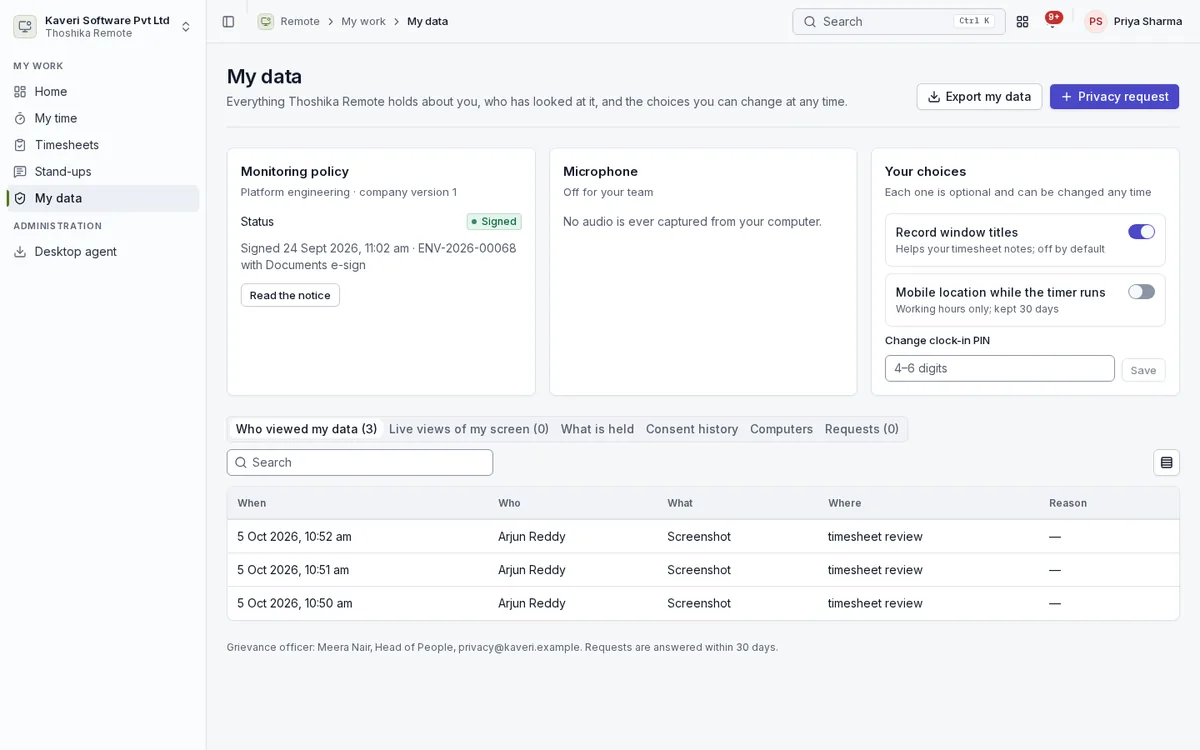
My data and privacy
Every employee can see everything held about them and who has looked at it.
- Monitoring policy and signature status, with the notice to read again
- Who viewed my data, live views of my screen, what is held and consent history
- Choices for window titles, mobile location and clock-in PIN, changeable at any time
- Export of my data and privacy requests for access, correction or erasure
- Sensitive apps such as banking, health and password managers never recorded
- Retention per data type with automatic deletion